
Download the ratings as CSV or XLS
Premium and Professional members can pull a full race card out of the browser as a CSV or XLS file and work with the ratings in their own spreadsheet.
Sometimes you want the ratings in a spreadsheet rather than on screen, to sort your own way, add columns, or keep a record. RatingTheRaces lets you export a full race card as a CSV or XLS file. Downloads are included with Premium and Professional accounts.
Yesterday, today and tomorrow: from your dashboard
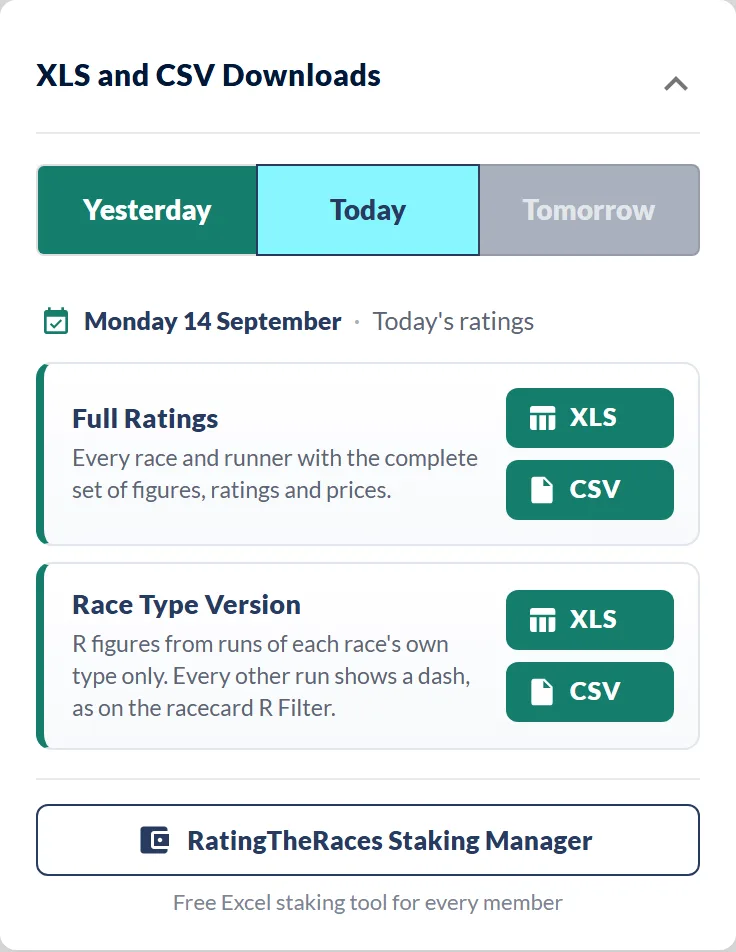
The quickest way to grab a whole day. On your dashboard the XLS and CSV Downloads panel has a Yesterday / Today / Tomorrow toggle, a line confirming which day you are about to download, and a card for each file with one-click XLS and CSV buttons. Yesterday's files come with the results and XSP included.
Any other day: from the Ratings
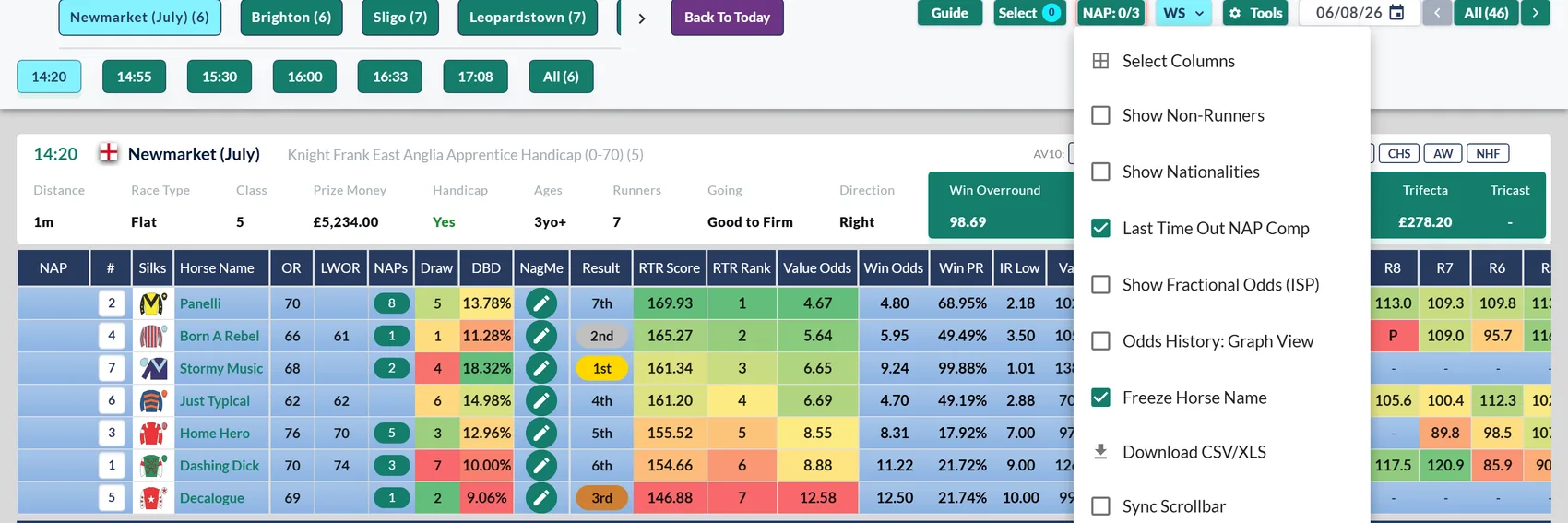
To download a past day (or any day while you're browsing the cards), navigate to it on the ratings first, then use the Tools menu:
- Open WebRatings and use the date picker (the calendar beside the date at the top of the grid, or the ‹ › arrows) to move to the day you want. Back To Today jumps you back.
- Click ⚙ Tools at the top of the grid.
- Choose Download CSV/XLS, then pick your format.
Then open the file, see Opening the file in Excel or Sheets.
How far back can I download?
Everyone on a paid plan can always download today, tomorrow, and every day that passes while you're a member. How far into the past you can reach depends on your plan and your billing term (monthly, 6-monthly or yearly). It's based on how long you've been continuously subscribed and only ever grows, renewing never resets it.
Professional: the full archive after 3 months
Whatever your billing term, once you've been a Professional member for three months you can download the entire archive. Before that:
| Billing term | From day one | Until the archive opens |
|---|---|---|
| Monthly | one month back | one more month back each month |
| 6-monthly | six months back | stays there until the 3-month mark |
| Yearly | twelve months back | stays there until the 3-month mark |
After three months, every Professional member has the whole archive.
Premium: a window that keeps growing
Premium gives you a rolling window that grows the longer you're a member, but never opens the full archive. Longer billing terms start you further back:
| Billing term | From day one | How it grows |
|---|---|---|
| Monthly | no history before your join date at first | one month back once you've been a member a month, then another month back each month after that |
| 6-monthly | three months back | six months back at the 3-month mark, then another six months at each renewal |
| Yearly | six months back | a full year back at the 6-month mark, then another year at each renewal |
The Race Type Version
Below the Full Ratings card on your dashboard there's a second file card, Race Type Version. It's the same day's data, but the run-score (R) figures only count a horse's runs of today's race type, so on a Flat card you see each horse's Flat R figures and any hurdle or chase runs show a dash. It keeps like with like for a horse that has switched codes.
CSV or XLS, which should I take?
- Take CSV if you're going to import the data somewhere, feed it into your own model, or you just want the raw numbers with no fuss.
- Take XLS if you'd rather open a ready-made, formatted workbook and read it much as it looks on the site.
What's in the file
The export carries every ratings and stats column from the racecard for the runners in that card: the RTR figures, odds and value columns, R10 to R1 and the AV figures, the horse, trainer, jockey and sire records, OR, C AE, Win %, LR O/R, Draw by Distance and the horse's field size, direction and class records. Professional members also get LWOR. The only racecard columns you will not find are your own NAP and NagMe marks, which are personal to you, and the silks. For what each heading means, keep the ratings columns reference open alongside it.
C AE and Win %, side by side
In both files C AE sits immediately to the left of Win %. They are neighbours only because both joined the download at the same time and went on the end together. They measure different things, and Win % is not a percentage of C AE.
- C AE is the Combined A/E: one figure that blends every A/E on the runner's row. That is the horse, jockey, trainer and sire win and place A/Es, plus the draw and the jockey and trainer, jockey and sire, and trainer and sire pairings, each one weighted by the number of runs behind it. It is a ratio, not a percentage: above 1 means those records have been beating the market, below 1 means they have been over-bet. A runner with no records behind it at all shows 0. How A/E works is in What does A/E mean?
- Win % is the horse's win chance from our Value Odds: 100 ÷ Value Odds. Value Odds of 4.0 is 25, and every runner's Win % in a race adds up to 100. The file carries it as a plain number with no % sign. More in Value Odds, Value % and Win %.
Two columns that are not on the racecard
Added on 26 September 2026, both included with Premium and Professional:
- Beaten Fav LTO reads
TrueorFalse: was this horse the beaten favourite last time out? It is the flag only, so the price, course and date of that run stay on the BF hover on the racecard. On a typical day it is true for a small share of the card, 35 of 468 runners when this was written. - Claim (lbs) gives the apprentice or conditional allowance as a plain number, 3, 5, 7 or 10, and is blank when the jockey does not claim.
The two files put them in different places, which is worth knowing before you build anything on top:
- In the CSV, each one sits beside the column it belongs to: Beaten Fav LTO straight after Horse nationality, Claim (lbs) straight after Jockey name. Because the claim is tied to the jockey, hiding Jockey name in Select Columns hides the claim with it.
- In the XLS Raw Races tab, the two sit together near the right-hand end, after Weight (lbs) and before the Professional columns (LWOR and the Last Handicap Win block). Since 3 October they are on the WS, PS and WP sheets as well, so you get them whichever sheet you work from.
The four tabs in the XLS
- WS, PS and WP are the formatted race cards, laid out much as the site shows them, in the win, place and win-place stat views.
- Raw Races is one flat table, one row per runner, every column. This is the tab for pivot tables, lookups, macros and your own models.
If you build against these files, read a column by its heading, not by its position. New columns usually go on the right-hand end, and Weight (lbs) did in September, but that is not a promise we can keep for every column: Beaten Fav LTO and Claim (lbs) went in beside the horse and the jockey in the CSV, which shifts the position of everything to their right, and they land somewhere different again in the XLS. A lookup on the heading copes with all of that. A macro pointed at a column number does not.
The CSV is the Raw Races table on its own, trimmed to the columns you have switched on in Select Columns. Switch a column back on and it reappears in your next download.
Downloading one race
A member asked for this one. If you only want the race in front of you, there is a Download race button on the racecard, at the right-hand end of the View bar and on the single-race page. Professional.

It gives you that race's CSV only, and the file is built at the moment you click it, so the prices in it are as fresh as the ones on the card rather than whatever the day file held when it was last rebuilt. The Odds Movement columns come with it, so you get the opening price, the latest and the move alongside the ratings.
The full day's files are unchanged and still where they always were.
Trying it on a free account
Downloads are a Premium and Professional feature, but you do not have to take our word for what is in them. Any signed-in member, free accounts included, can download one full sample day as both XLS and CSV: a real card from earlier in the season, complete, with nothing stripped out. It is in the Downloads panel where the padlock used to be. Open it in your own spreadsheet and you will know exactly what you would be getting before you spend anything.
Was this article helpful?