
How to change your display name
Your display name is the name that appears on the leaderboards and beside your NAP entries. You can change it whenever you like, from your own profile page.
Signed up with something you have gone off? Your display name is yours to change, and it takes about ten seconds.
Changing it
1. Click your name, top right
On the ratings, your name sits in the top right corner of the header, above the time and date.

Click it and it opens your own profile page. Give it a couple of seconds: it says Your profile is loading while it fetches your record.
2. Press Edit Profile
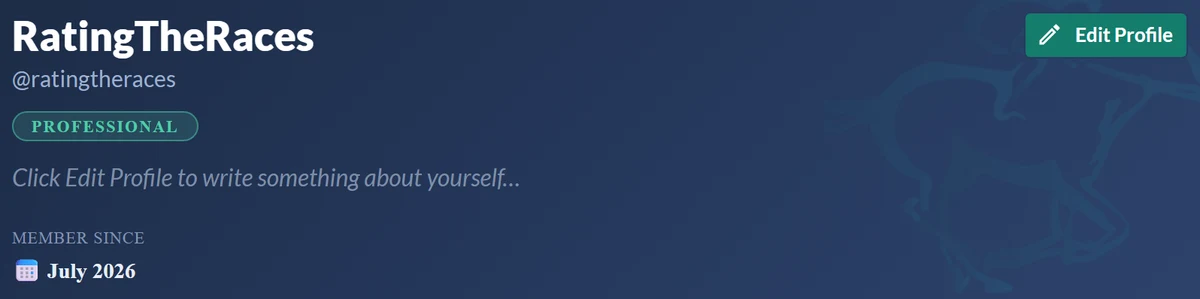
Your profile opens with your name across the top and an Edit Profile button on the right.
3. Change the name and save
The first box in the form is Display Name, marked the name shown on leaderboards and your NAP entries. Type the new one over the old one.
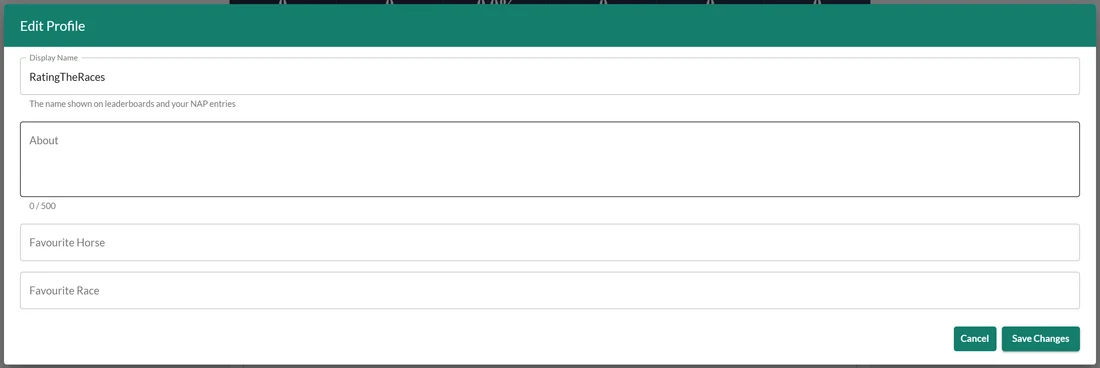
Press Save Changes and it is done. The leaderboards show the new name from then on.
While you are in there, the same form holds your About (up to 500 characters), Favourite Horse and Favourite Race. You can change any of them, or none, and save.
What the rules allow
A display name has to be:
- Between 2 and 40 characters.
- Not already in use by another member, as either their display name or their username. Capitals make no difference, so if somebody is already Lucky Jim you cannot be LUCKY JIM.
- Not posing as us. Anything containing "RatingTheRaces", or names like RTR, admin, support, staff or moderator, is kept back for our own accounts.
If a name is refused we tell you which rule it fell foul of, rather than just saying no, so you can adjust it and try again.
A few things worth knowing
- Your login does not change. The display name is separate from the username and password you sign in with, so changing it will not lock you out. To change those, see How do I change my email address? and How do I change my password?.
- Leaving it alone is always fine. We only check the name when you actually change it, so if you share a name with somebody from the early days you can still edit your About and favourites without being blocked.
- It is the name everyone sees. Your display name appears on the leaderboards when you place, on today's NAP entries, and in any member competition you play in. The rest of your profile stays private, see Your member profile.
- Pick one and stick with it. Nothing in your record is lost when you rename, but the boards are how regulars know you, and the period awards are totted up by name, so chopping and changing is worth avoiding.
Was this article helpful?