
Email and notification preferences
You're in control of what lands in your inbox. Every kind of RatingTheRaces email has its own switch on your profile page.
Not every RatingTheRaces email is the same, and you don't have to take all of them to keep the ones you want. The Email Preferences card on your profile page lets you decide what arrives.
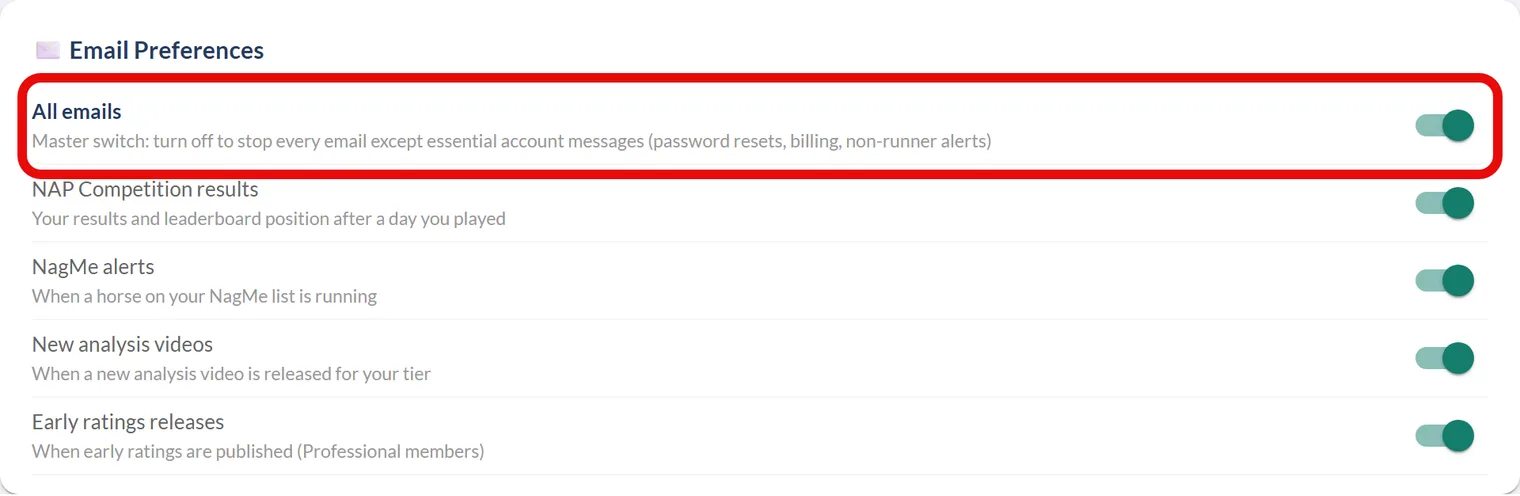
Where to find your preferences
- Sign in and click your name in the top right to open your profile.
- Scroll to the Email Preferences card.
- Flick each switch on or off, changes save automatically as you go.
The switches
At the top is the master All emails switch. Turn it off and every email stops except the essential account messages tied to your login and subscription, things like password resets, billing notices and non-runner alerts. It's also your marketing opt-out: with it off, no news or offers are sent.
Below it, each kind of email has its own toggle:
- NAP Competition results, your results and leaderboard position after a day you played.
- NagMe alerts, the moment a horse on your NagMe list is declared to run.
- New analysis videos, when a new analysis video is released for your tier.
- Early ratings releases, when early ratings are published (Professional members).
Just want the marketing to stop?
You don't even need to sign in for that, use the one-click unsubscribe link in any marketing email, see How to unsubscribe from emails.
Was this article helpful?