
Creating your own competition
Any member can set up their own competition: pick the courses, the dates and how scoring works, hand out an invite link, and we keep the leaderboard for you.
Plenty of people already run a tipping comp with their mates on a spreadsheet or in a group chat, and somebody always ends up settling arguments about prices. Member competitions take that job off you. You set it up, send out a link, and we score every pick and keep the table.
It is free, and it is open to every member, including free accounts.
Before you start
- You need a linked X account to create one, because we announce the competition from your account. If yours is not linked yet, we walk you through it when you submit.
- Your players do not need X. Anyone with a free RatingTheRaces account can join, open or private.
- You can be in 5 active competitions at once, counting ones you run and ones you have joined.
- We do not provide prizes. Whatever you play for is between you and your players, and you arrange it yourselves. We supply the leaderboard and the scoring.
Setting one up
Open Leaderboards, go to the Member Comps tab and press Create a Competition.
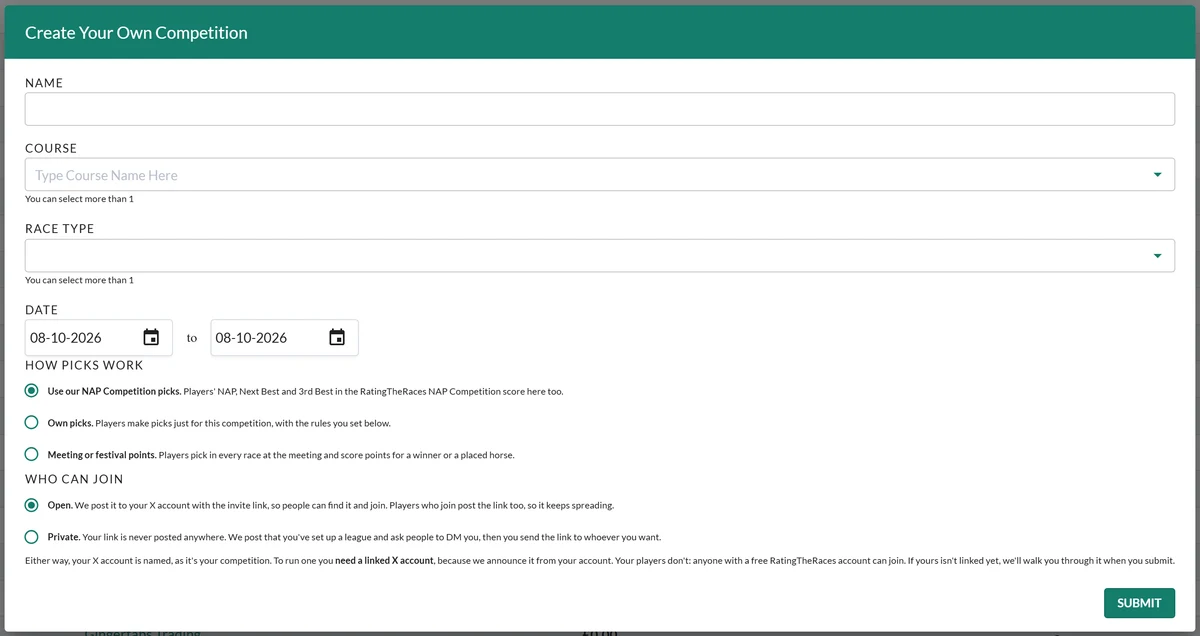
The basics
- Name. What your players will see at the top of the board.
- Course. Leave it empty for all racing, or pick one or more. A Cheltenham-only competition scores only what happens at Cheltenham.
- Race type. The same idea: handicaps only, chases only, whatever you like. More than one is fine.
- Date. The first and last day. A single Saturday, a festival week or a whole season.
How picks work
This is the decision that shapes everything else, and there are three.
Use our NAP Competition picks. The simplest. Your players carry on entering the main NAP Competition as usual, and those same picks score in your league too. Nobody has anything extra to do.
One thing to understand here: scoring is per pick, not per entry. If your competition is Cheltenham only and a player's NAP is at Cheltenham but their Next Best and 3rd Best are at Kempton, only the NAP counts. That is usually what people want, but it surprises players who see a low score. We warn them before they submit, so nobody finds out the hard way.
Own picks. Players make picks just for your competition, separate from the main one, and you set the rules.
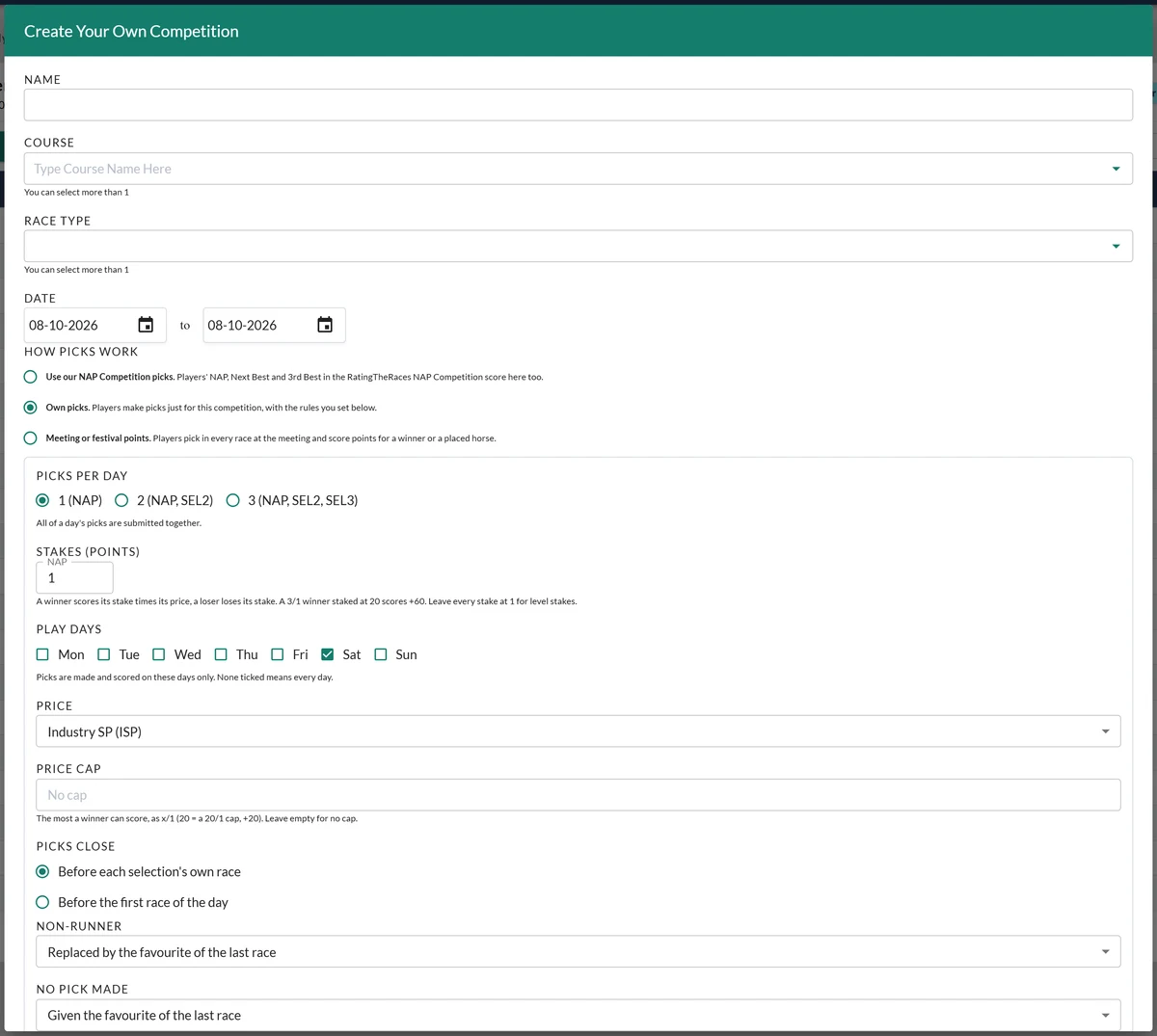
- Picks per day: one, two or three. A day's picks are all submitted together.
- Stakes (points): a stake per slot. A winner scores its stake times its price, a loser loses its stake, so a 3/1 winner staked at 20 scores +60. Leave everything at 1 for level stakes.
- Play days: tick the days that count. Saturdays only is the popular one. Tick nothing and every day counts.
- Price: Industry SP, Exchange SP, the exchange price at the moment the pick was made, or let the player choose between the exchange price and XSP.
- Price cap: the most a winner can score, as x/1. Put 20 in and a 50/1 winner scores as a 20/1 one. Leave it empty and one lucky result can decide your season.
- Picks close: before each selection's own race, so players can pick through the day, or before the first race of the day, which stops anyone having an edge from earlier results.
- Non-runner: replaced by the favourite of the last race, replaced by the favourite of the non-runner's own race, void and scores 0, or counts as a loser.
- No pick made: given the favourite of the last race, given the favourite of the richest race, scores 0, or counts as a loser. You can cap what a given favourite can score, so a player who forgets cannot win the week off the back of it.
- Notes: anything the settings do not cover, in your own words.
- Can players see each other's picks? Only after they have submitted their own, or at any time.
Meeting or festival points. Built for a single meeting: players pick in every race, and score the odds times a multiplier for where their horse finishes.
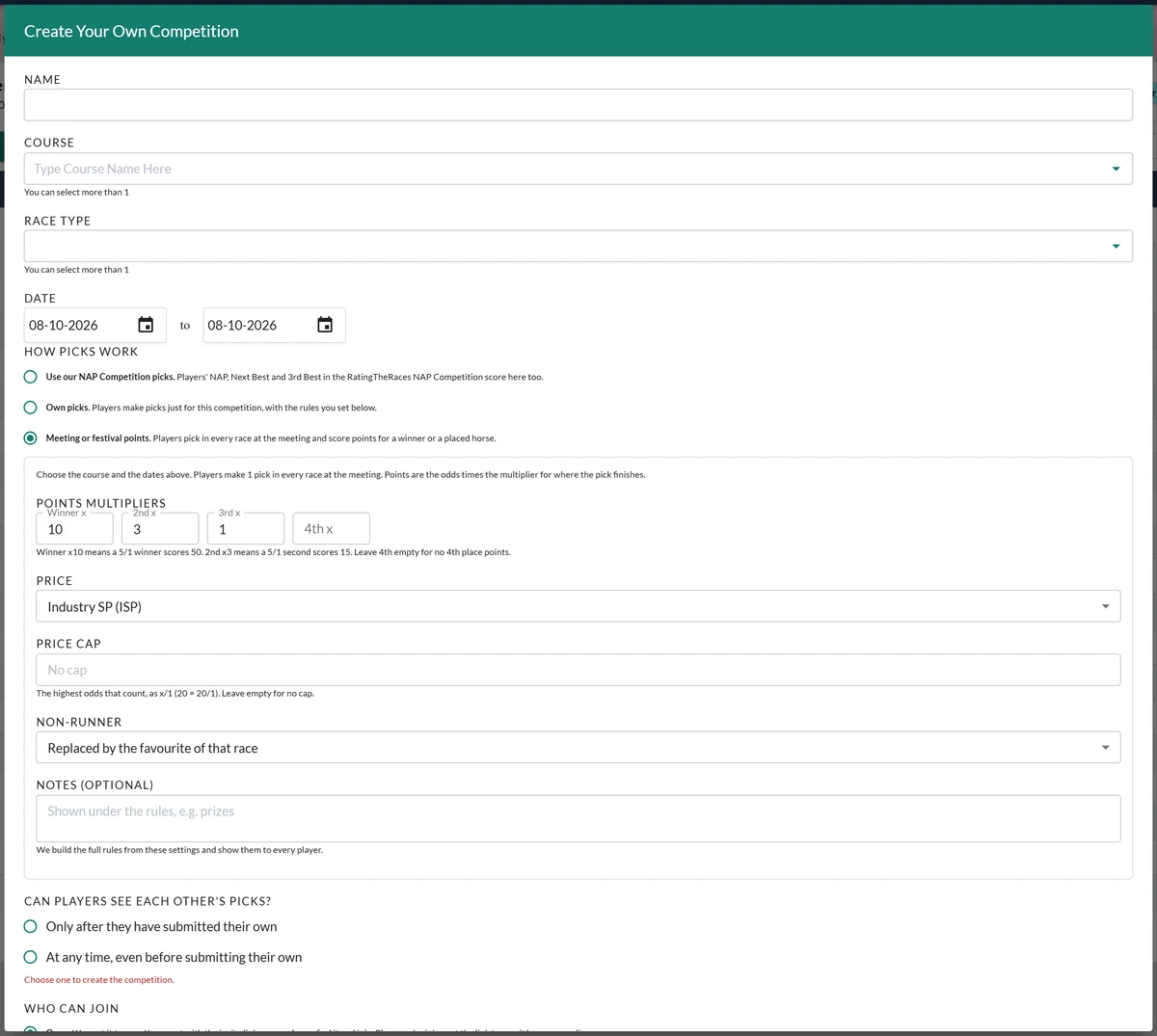
Set a multiplier for the winner and for 2nd, 3rd and 4th. Winner x10 means a 5/1 winner scores 50; 2nd x3 means a 5/1 second scores 15. Leave 4th empty if you do not want fourth place to score.
Whatever you choose, we write the rules out in full from your settings and show them to every player, so there is one version of the truth to point at.
Who can join
- Open. We post the competition to your X account with the invite link in it, and players who join post the link too, so it spreads.
- Private. The link is never posted anywhere. We post that you have set up a league and ask people to DM you, and you hand the link out yourself.
Private means unlisted rather than locked: anyone with the link can still join, so treat it like a door key. Either way your X account is named, because it is your competition.
When joining closes
A competition where somebody can wander in on the last Saturday and still win it is not much of a competition, so you decide when the door shuts. When does joining close? gives you three answers:
- Never, the default. Anyone with the link can join at any point.
- At the off of the first race of the competition's first play day.
- At the off of the last race of that first day, which gives stragglers the day to get in.
Once it has closed, the invite link says entries have closed rather than offering a sign-up, so a late arrival is told plainly instead of joining and wondering why they cannot pick.
Late joiners, on an own-picks competition
If you leave joining open, somebody joining in week three has missed days that everybody else played. You choose what those missed days are worth to them:
- Nothing, the default: a missed day scores 0.
- A loss for each selection, which keeps them level with a player who turned up and picked badly.
Either way, a late joiner is never handed the favourite for a day they were not there for. That rule exists because of a real case in testing: a player who joined after the last race had run was given its winning favourite and the points that came with it. A day counts as missed once its picks have closed.
Once it exists
Share the link. There is no public list of competitions, so the invite link is the only way in. Somebody opening it who has not got an account can create a free one on the way through.
Watch the board. Your competition gets its own leaderboard with day-by-day navigation and a My picks view, so players can look back at earlier days.
The rules are always to hand. Every competition now carries a Rules button, whichever format it uses, showing the full set we built from your settings. Nobody has to remember what you told them in the group chat.
Finished competitions get out of the way. The Member Comps list has an Active only / All switch, so a season of old leagues does not bury the one being played this Saturday.
Manage players. As the owner you can remove somebody from your competition. A removed player cannot rejoin, so it is worth being sure.
Read the daily email. After each day's racing settles we email you an update: how many played and how many forgot, the biggest winner, the closest shave, and the top five. It is the quickest way to keep a league alive, because that is the stuff worth putting in the group chat.
Things worth knowing
- Prices and settlement are ours, taken from the same data as the main competition, so nobody has to argue about what price a horse was.
- There is no edit screen. Once a competition exists its settings are fixed, so get the name, dates and rules right before you send the link out. If something is genuinely wrong, get in touch before people start picking.
- Your players keep their normal entries. Playing in your league does not affect anyone's main NAP Competition record or their prizes.
Was this article helpful?