
How to add a horse to your NagMe
NagMe is a free tool that emails you when a horse you're watching is next declared to run. Add any runner you want to keep an eye on, straight from the racecard.
NagMe is a free tool that does one very useful thing: it emails you when a horse you're following is next declared to run. Instead of checking the cards every day for a runner you fancy, you add it once and let NagMe do the watching, so you never miss it again.
Add a horse to your NagMe
- Open any racecard. Every runner has a NagMe pencil in the NagMe column.
- Click the pencil next to the horse you want to follow.
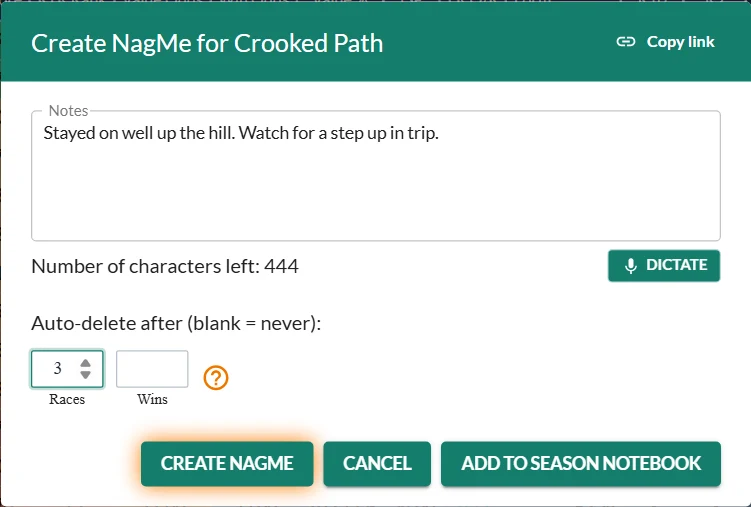
- Add a note so you remember why you liked it, or press Dictate and say it instead.
- Set Auto-delete after if you want the horse to drop off your list by itself (more on that below), or leave it blank.
- Click Create Nagme. The pencil turns red, so you can see at a glance the horse is on your list.
We email you the evening before it runs, once the next day's cards are out.
The same pencil sits beside every run on a horse's form page, so you can add a NagMe from there too. And on Premium and Professional, the Find Horse button on the racecard bar and your dashboard finds any horse by name, running today or not, and offers Add a NagMe straight away.
What's in the pop-up
- Notes: up to 500 characters. Dictate uses your browser's own speech recognition, so it works in Chrome, Edge and Safari but not Firefox.
- Auto-delete after: two boxes, Races and Wins. Put a number in either and the horse leaves your list after that many more runs, or that many wins, whichever comes first. Leave both blank to keep it until you remove it.
- Add to Season Notebook: file the horse under a big race in your Season Notebook at the same time.
- Copy link: in the title bar, a link that opens this horse's NagMe pop-up on the card, handy for pasting into a message or a post.
What the pencil colours mean
- Green: not on your list. Click to add it.
- Red: one of your NagMes. Click it to update your note or press Remove.
- Yellow: on Liam's Tracker, our own list of horses to follow. Hover to read why.
- Blue: on Liam's Tracker and on your own list.
The icon just to the right of the pencil is for your own notes on the horse. A note sets no alert and never uses up a NagMe, so use it for horses you want to remember without being emailed about them.
NagMe limits by plan
Every account gets NagMe, including Free accounts. How many horses you can follow at once depends on your plan: 30 on Free, 50 on Premium and 75 on Professional. Your list's heading shows where you stand, for example My NagMes (3 out of 75). If you're at your limit, remove a horse you no longer need before adding a new one.
Horses on Liam's Tracker don't count toward your total unless you add one to your own list.
Want to act on the alert?
When a NagMe horse is declared, it's a natural moment to make it your pick in the free NAP Competition, and you can keep a record of how those horses perform in the Staking Manager. To see, edit or tidy your list, see Managing your NagMe list.
Was this article helpful?