
Saving your picks with Selections
Selections is your personal slip: tick the horses you fancy on any racecard, save the group with an optional comment, and look back on how they ran.
Selections lets you keep a record of the horses you like for the day, separate from your three NAP Competition picks. Every member can use it, including Free members.
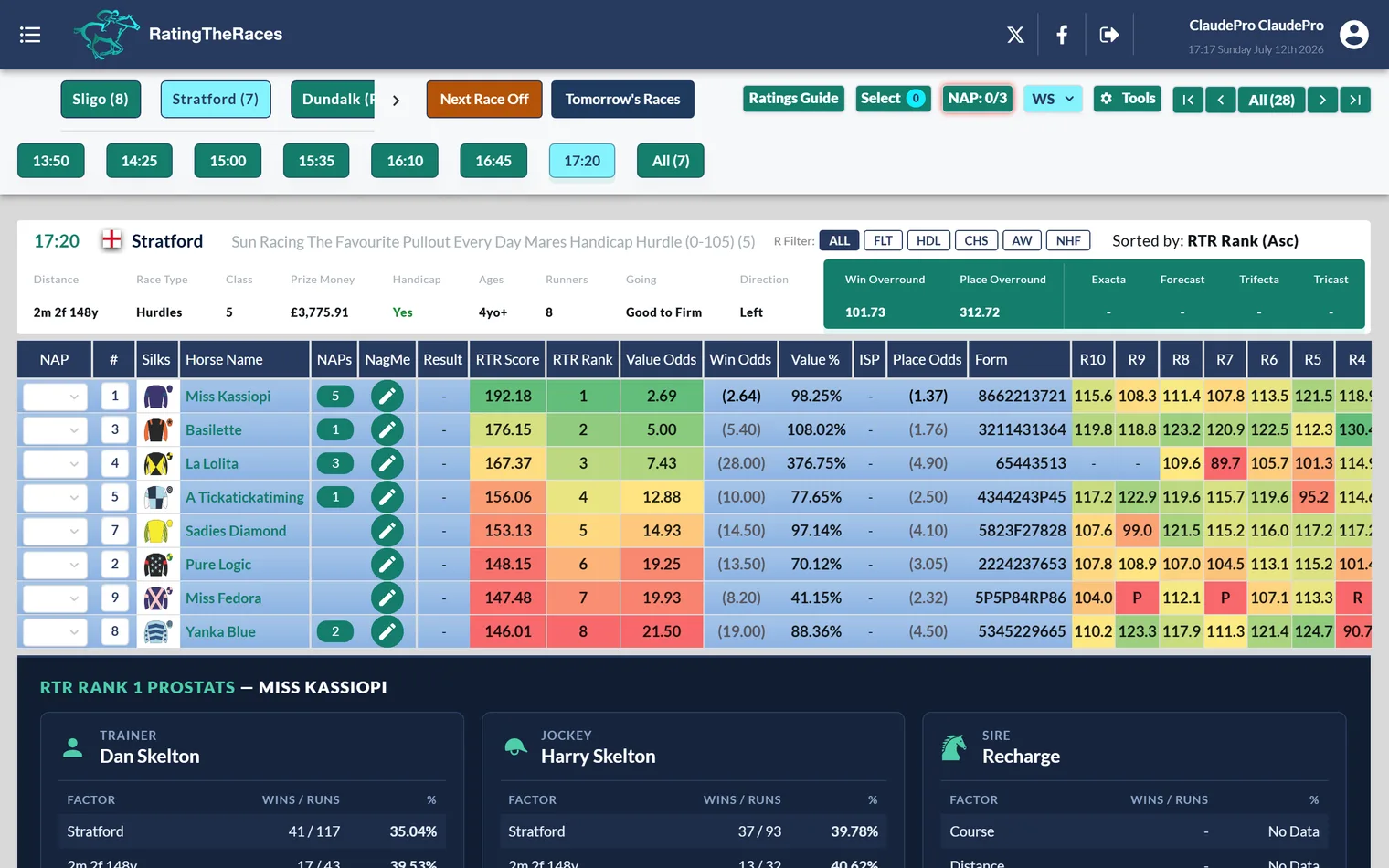
Picking horses
- Open any of today's racecards and click a runner's row, the tick appears in its Select box. Click again to untick. (Clicking the horse, jockey, trainer or sire name opens their history page instead, so use the other cells.)
- The Select button at the top of the racecard counts your picks as you go.
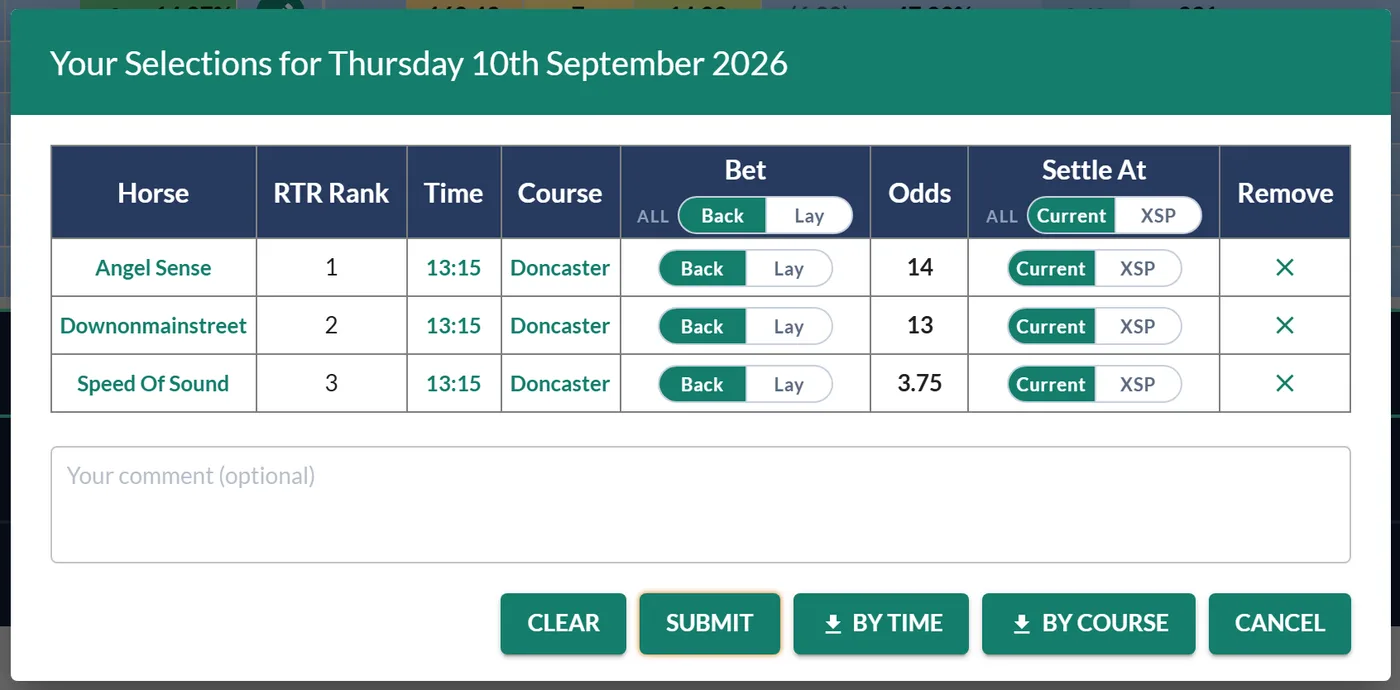
- Click Select to open your slip. It lists your horses with the time and course, the odds and, for Premium and Professional members, each horse's RTR Rank. Add a comment if you want to note your thinking.
- Press Submit to save the group. You can carry on picking across different races and meetings before submitting.
Adding more horses after you've already submitted creates a new selection group, the app will ask you to confirm first.
Back or lay, and how it settles
Every member can treat each pick as a back or a lay, right there in the slip. A lay wins when the horse doesn't, and loses if it does, the exact mirror of a back. The All switch in the column header flips every row at once.
You also choose what price each pick settles at:
- Current: the live exchange price, which keeps following the market until you press Submit. Submit is what locks it in.
- XSP: the exchange Starting Price, worked out after the race.
An All switch sets every row together here too. See XSP explained for what the exchange SP is.
When the Current price is locked
Nothing is fixed while you are still building the slip. A pick you add the night before shows whatever the market says at the time, and an overnight market is thin, so that first number can look odd. Leave it alone and it keeps updating: what gets recorded is the price when you Submit, not the price when you ticked the horse.
Two details follow from that:
- A race that has already started keeps the price it had. Submitting later does not reprice a pick whose race is off.
- Downloading your slip locks it too, on the same terms, so the file and your record always agree.
The Shortlist: a roomier look at the day's picks
Next to Select there is a Shortlist button. It opens the same picks in a much bigger, read-only view, grouped race by race, which is the one to use when you are weighing the day up rather than submitting it.
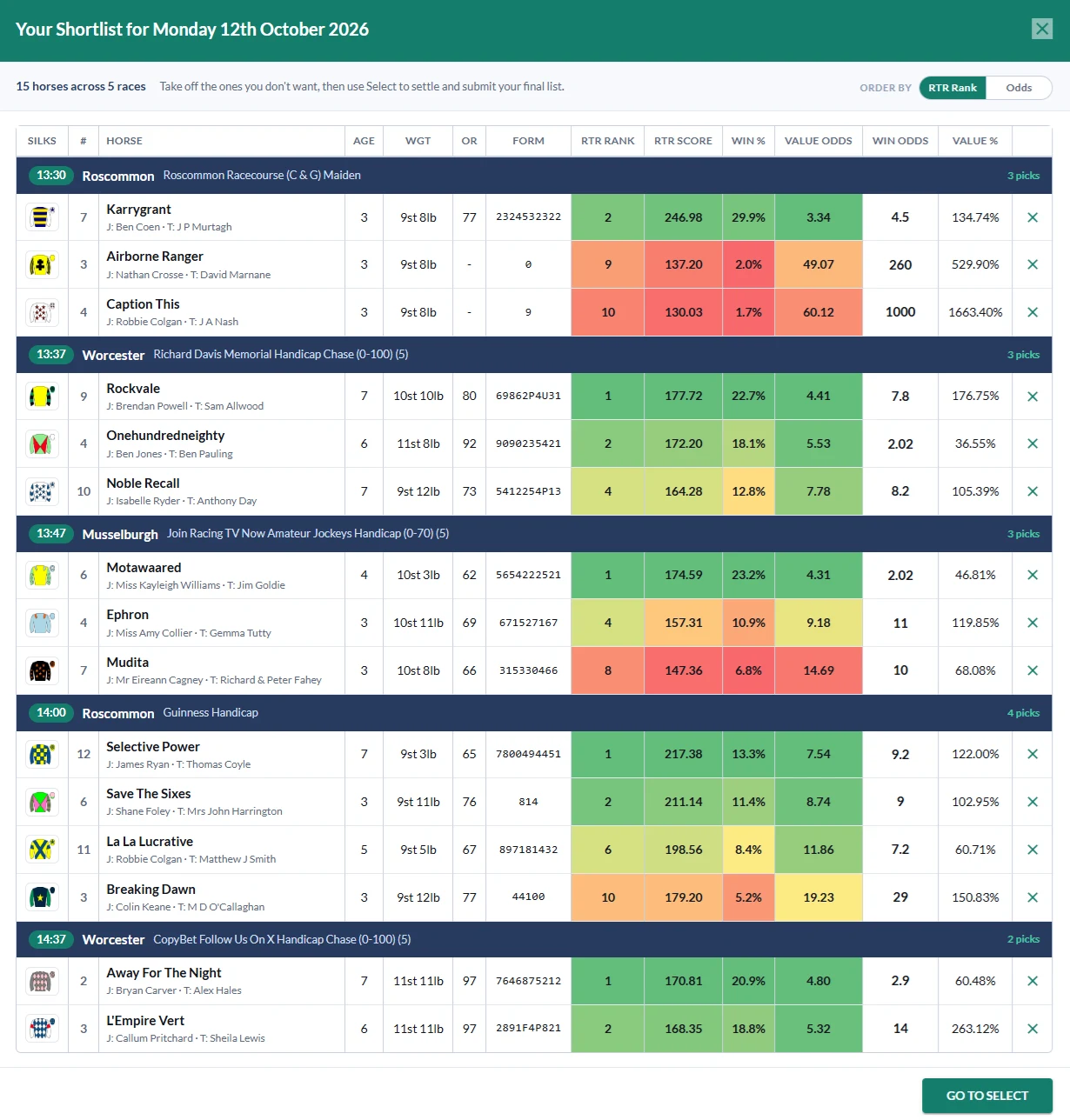
A line at the top counts what you are looking at, for example 15 horses across 5 races, and reminds you what it is for: take off the ones you do not want, then use Select to settle and submit the rest. Each race gets its own band with the time, a link to the card, the race name and how many you have picked there. Under it, every pick with its silk and number, the horse with its jockey and trainer, age, weight, OR, form and odds. Premium and Professional members also get RTR Rank, RTR Score, Win %, Value Odds and Value %, and those cells carry the same heat colours as the racecard, so a strong pick looks strong at a glance.
There is no Bet switch, no Settle At and no Submit here: it is for weighing up. Each row ends with an x that takes the horse off your selections, unticking it on the card as well, so the Shortlist is where you cut a long list down. When you are happy, Go To Select hands over to the submit dialog.
Ordering within a race
Races always stay in running order, but inside each race you choose how the picks are sorted. Premium and Professional members get RTR Rank first by default; free members get A to Z. The Order by switch at the top right flips between RTR Rank and Odds (shortest first), and your choice is remembered in that browser.
The Select dialog itself now leads with a Silks column, so you can recognise a horse by its colours rather than reading every name.
On a phone the Shortlist fills the screen and gives each horse its own card.
RTR Rank and removing a pick
Premium and Professional members see each horse's RTR Rank in the slip, so you can weigh your picks against the ratings without leaving the dialog. Every member also gets a remove button on each row: it drops that pick and unticks it on the card in one go, with no need to close the dialog and hunt for the row.
If you add horses from a ProStats system, the slip also shows an Added Via column naming the system that added each one.
Your selections page
The My selections page (also linked from the My NAPs & Selections widget on your dashboard) lists every group you've saved by date, with your comment and how each horse got on, including whether each pick was a back or a lay. A Back / Lay / All switch filters the view, and the dashboard's Selection Stats tab totals up your winners, P/L and ROI, with a Lay option alongside Win and Place.
Downloads
Premium and Pro members can download any selection group as a spreadsheet, ordered By Time or By Course, handy for a day at the races or your own records.
Was this article helpful?