
RTR Rank 1 ProStats under each race
Under each race sits a ProStats breakdown for our top-rated horse: how its trainer, jockey and sire have done in conditions like today's, and whether backing them has actually paid.
Our top-rated horse is where many members start. RTR Rank 1 ProStats puts the people and the breeding behind it under the microscope, right under the race, without you having to open ProStats and build the filters yourself.
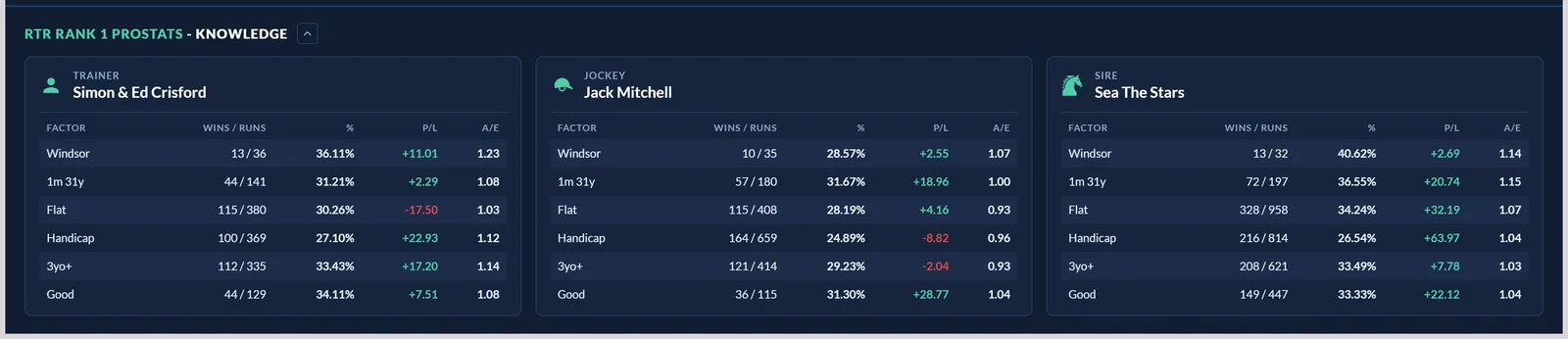
What it shows
The heading names the top-rated horse, and underneath are three cards:
- Trainer: how the yard has done.
- Jockey: how today's rider has done.
- Sire: how the sire's runners have done.
Each card is measured against today's race, one row per factor: this course, this trip, this race type, handicap or not, this age group and this going. So you can see at a glance whether the connections thrive in exactly these conditions or merely look good overall.
Reading the columns
- Wins / Runs and %: the record, and the strike rate it adds up to.
- P/L: the profit or loss to level stakes at the Exchange SP, in points. Green is in profit, red is not.
- A/E: actual winners against the number the prices implied. Above 1.00 means the angle has beaten the market, not just found short-priced winners. See What does A/E mean?
Reading P/L and A/E together with the strike rate is what tells you whether a trainer's numbers are worth following, rather than just frequent.
Showing, hiding and minimising
The section is switched on and off in Tools, under Below the ratings. Use the button beside the heading to minimise it: that choice applies under every race and is remembered next time. It loads its figures as you scroll down to it, so a full day of racing stays quick.
The Overall row, the pairing and hiding what you do not use
Three changes in October.
Every card ends with an Overall row. That is the trainer's, jockey's or sire's record with every Top Rated runner, with no factor applied. It is the baseline: a 30% strike rate at this course means a good deal more when the yard's overall figure is 12% than when it is 28%. Free and Premium members see the Overall rows too.
Trainer and jockey cards carry a pairing row. At the top of the card, above Overall, you get the record for this trainer with this jockey, headed With and the other one's name. Some yards are a different proposition when their stable jockey is on board. A combination with no previous runs together reads No Data.
Edit filters on the strip header opens a list of every row the trainer, jockey and sire cards can show. Untick the ones you never look at and they disappear from that card on every racecard, saved in your browser, and the change applies across the strips straight away. Turn every row off on a card and the card itself goes.
All races, or only today's kind
A member pointed out that the rows mixed Flat, hurdle and chase runs together, which flatters or punishes a yard depending on what it mostly does. There is now a switch at the top of the strip: All races, or only today's race type and handicap status.
Flick it to the second and every row, the pairing included, counts only runs in races like today's, and the Overall row renames itself to say so, for example All Handicap Chases. The Type and Handicap rows disappear while it is on, because they would only repeat Overall.
Was this article helpful?