
Your NAP results and scores
Once your picks have run, your results slip shows how each one got on and totals your score for the day, the week and the month.
Entered the NAP Competition? You don't have to go hunting for how your picks got on. Your results come to you, with your running scores alongside.
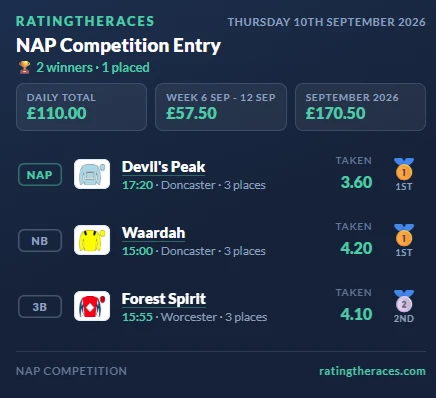
Your results pop up when you're back
Once all three picks from your latest race day have run, your results slip opens by itself the next time you visit. It shows each pick, the price you took and where it finished, with a medal for the winners and placed horses. It appears once: close it and it stays out of your way.
Want it again later? Open any of that day's racecards and click NAPs: Done to reopen the slip.
Reading your scores
Three figures sit across the top of the slip:
- Daily Total: your score for the day. While races are still to be run it shows how many of your three are in, for example Daily Total (2 of 3 in), and it climbs as each result lands.
- Week: your score for the current week, Sunday to Saturday, the same week the weekly leaderboard runs on. The label gives you the dates.
- Month: your score for the calendar month, labelled with the month itself.
These are the same figures the leaderboards rank you on, so you can watch a run of form build without opening the leaderboards. Each pick scores to match the bet type you chose for it, Win, Place or Each-Way, see How to play the NAP Competition.
On your dashboard too
The same day, week and month scores appear at the foot of the My NAPs table on the Competition tab of your dashboard, next to the All My NAP Results and Post Results buttons.
Share it
Had a good day? The results card you can post to X carries these scores too, see How to post your NAP results to X. And to see everyone else's picks for the day, head to Today's NAP Entries.
Was this article helpful?